

Automation
The extension can translate content without the wizard, in three ways: automatically after somebody saves a record, on a schedule, and from the command line. All three put their work into the background queue.
The modes at a glance
| Mode | What starts it | Creates a translation job | What it translates |
|---|---|---|---|
| Translate on save | A save of a watched record in the default language of the shop | No | The saved records only, and the missing fields only |
| Scheduled translation | The hourly scheduled task, a maximum of once per configured interval | Yes, one job per provider | Records with missing translations |
| Command line | You, or your own cron entry | Yes | The content types and the scope that you pass |
The Flow Builder trigger has no row in this table, because it fires after a job finished. It never starts a job.
Message queue workers
Each kind of translation work goes to the Shopware message queue, and a worker executes it: wizard runs, quick translations, automation, CLI jobs and job-wide reverts. If no worker operates, the jobs stay in the status Queued, and on-save automation produces nothing.
The extension marks its own messages as low priority. A worker can therefore put the core queue traffic of Shopware before a long bulk translation. The extension only declares that priority. The isolation and the throughput that you get in practice depend on your own messenger configuration and worker configuration.
The two commands
Your server needs one worker for both the async and the low_priority transport, and also the scheduled-task runner:
bin/console messenger:consume async low_priority --time-limit=60 --memory-limit=512Mbin/console scheduled-task:run --time-limit=60 --memory-limit=512MBoth commands are necessary. messenger:consume performs the translations, and scheduled-task:run drives the two scheduled tasks of the extension:
| Task | Default interval | What it does |
|---|---|---|
nice_translate.auto_translate | 1 hour | Examines whether a scheduled translation run is due, and deletes the translation history that passed its retention period |
nice_translate.dispatch_batches | 1 minute | Dispatches the queue work whose delivery was lost, and relays the Flow Builder event of finished jobs |
The hourly task also performs the history cleanup. The scheduled-task runner is therefore important even in a shop that never enables scheduled translation. Translation history describes the retention.
Operate the commands under a process manager
--time-limit and --memory-limit make each worker exit at regular intervals, which keeps its memory use bounded. Something must therefore start the worker again. Operate both commands under a process manager. systemd and supervisor are the usual choices. Configure the process manager to do this:
- start the command again each time that it exits, which includes an exit after a deployment or a crash;
- start it as the same system user as your web server, from the Shopware root directory;
- restart the workers after each deployment, so that they load the new code.
For the unit definition or the program definition itself, read the documentation of your hosting provider, or the hosting guide of Shopware. Nothing about it is specific to this extension.
WARNING
A shop without workers looks broken to the merchant. The jobs never leave Queued, the on-save translations never appear, and the scheduled run never happens. Troubleshooting shows how to confirm that the workers consume the queue.
Several workers in parallel
Several parallel messenger:consume processes make large jobs shorter, because the workers translate the batches concurrently. They also multiply the load that hits the translation provider at the same moment, which makes rate-limit responses more probable.
The extension attempts a request that comes back with a rate limit or a server error up to three times, with an exponential backoff. It also honours a Retry-After hint from the provider, up to one minute. Everything that still fails after those retries goes into the error list of the job, and you can process it again with Retry failed items. If rate-limit errors accumulate, reduce the number of parallel workers before you change anything else.
Database sessions must be sticky
The extension serialises each batch with a MySQL advisory lock (GET_LOCK / RELEASE_LOCK). That lock prevents a second translation of the same records after a redelivery, and thus a second bill. An advisory lock belongs to a database session, therefore a worker must keep the same connection for the full handler call.
Database proxies that pool transactions or multiplex sessions are unsupported, unless they preserve the connection affinity. Your hosting setup decides whether that affinity exists, and the extension has no setting for it. See Requirements.
The admin worker is for development only
On a development system, the browser-based admin worker of Shopware also processes the queue while the Administration is open. That is sufficient for a test of the extension. The admin worker stops at the moment that somebody closes the browser tab, which makes it unsuitable for production. In production, use the two commands above.
Translate on save
Open Catalogues → AI Translation, click Settings and go to the Automation tab. Then enable Translate content automatically after saving. From that moment, a save of a watched record in the default language of the shop queues its missing translations in the background.
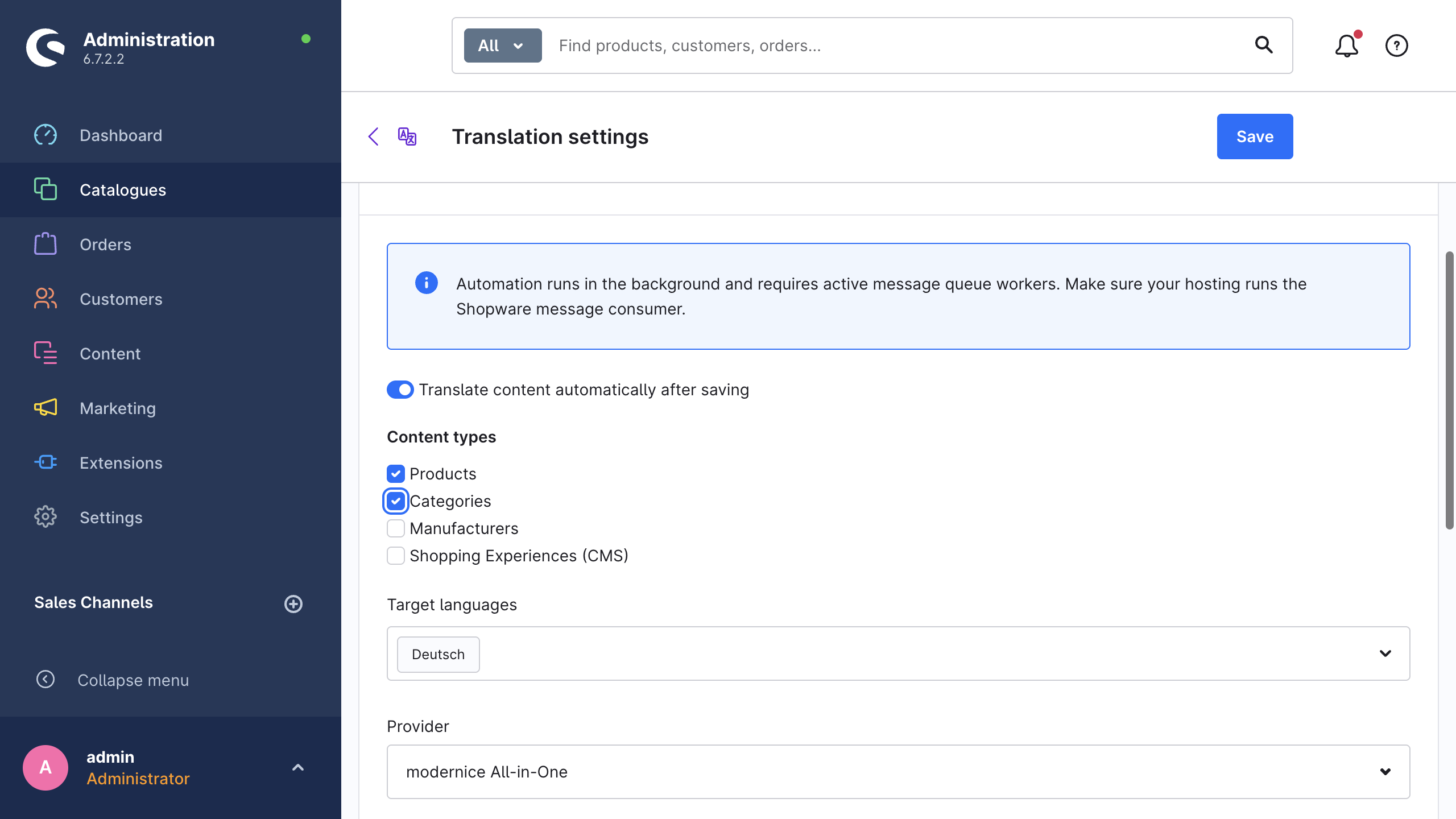
| Setting | What it does |
|---|---|
| Content types | The entities that the extension watches: Products, Categories, Manufacturers, Shopping Experiences (CMS). Nothing outside this list starts on-save automation. |
| Target languages | The languages that a save is translated into. The system default language is never a target. If you leave this field empty, nothing happens. |
| Provider | Either one provider for each target language, or Use language mapping / default. |
How the extension resolves the provider
With Use language mapping / default selected, the extension resolves each target language in this order:
- the provider that Settings → Providers → Providers by target language assigns to that language;
- the Default provider from the same tab;
- DeepL, as the built-in fallback.
If you select a specific provider, that provider overrides the full chain for each target language. Manual translations stay unaffected, and they keep the provider from the wizard or from the quick-translate dialog. Translation providers describes the mapping itself.
Sometimes the extension cannot resolve a target language to a provider, for example after somebody deleted the mapped provider. It then skips that language and writes the problem to the Shopware log. The save itself is still successful.
What an on-save run does
- The run fills the missing fields only. On-save automation never overwrites an existing translation, whatever the wizard defaults are.
- The run skips unchanged content and protects hand-edited translations, exactly like a wizard run with those options enabled. See Safety mechanisms.
- The extension ignores deletions, and it counts only the writes in the live version of the shop.
- Loop guard: the extension marks its own writes, therefore a written translation never starts another on-save run.
Where to see the result
On-save runs do not appear in the job list. They create no job header, therefore there is no entry under Jobs, no progress bar, no estimate and no cost line per job. The dashboard still records their monthly characters and tokens. See Cost & usage.
The changes themselves are visible field by field. With the history recording on, each changed field appears in the global translation history, and you can revert it there. The Open translation history link on the card goes directly to it. See Translation history.
Scheduled translation
The Translate missing content on a schedule option on the same tab creates jobs for untranslated content at a fixed interval. Catalogues that an ERP or a nightly import feeds have the largest benefit, because nobody is in the Administration to start a run.
The scheduled task nice_translate.auto_translate examines every hour whether a run is due. The configured interval decides how often a run is actually due:
| Interval | Runs a maximum of |
|---|---|
| Hourly | once per hour |
| Every 6 hours | once per 6 hours |
| Every 12 hours | once per 12 hours |
| Daily (recommended) | once per day |
| Weekly | once per week |
A check starts a run only after the configured interval passed since the last run. On a daily interval, that is one run out of 24 checks. While the switch is off, each check ends without a run, whatever the interval is.
Content types has its own setting for the scheduled runs, with the same four options as on save. Target languages is shared: scheduled translation uses the languages from the on-save card above it.
Last run shows the time of the last scheduled run, or Never. If the extension skips a run because another job is queued or running, the value stays unchanged, and the next hourly check tries again.
One job per provider
The extension groups the target languages by their resolved provider, and each group becomes its own job. A fixed provider override gives you one job. Use language mapping / default gives you one job for each provider that a target language resolves to. The grouping keeps the validation, the estimates, the costs and the labels specific to one provider.
Scheduled jobs have the title prefix Scheduled (<provider>): , therefore you can recognise them in the job list:
Scheduled (DeepL): Products, Categories → Deutsch, FrançaisEach scheduled job uses a fixed configuration. The extension selects only the records with a minimum of one missing translation. It fills the missing fields only, skips unchanged content and protects the manual edits. There is no interactive estimate, because nobody is there to confirm one.
When the extension skips a run
While any translation job is queued or running, the scheduled task does nothing and keeps Last run unchanged. It tries again at the next hourly check. A job that is stuck in Queued because no workers operate therefore blocks the scheduled translation completely.
Flow Builder
When a job finishes, the extension fires the business event Translation job finished (nice_translate.job.finished). In the Flow Builder it appears as the trigger AI Translation → Job → Finished.
The event contains the job id, the job title, the final status and the processed, failed and skipped counters. It also contains the mail address of the user who created the job. The Send mail action of Shopware can therefore address that person without further configuration.
The trigger fires for each finished job, which includes the scheduled jobs. On-save automation creates no job, and therefore no event. Events & Flow Builder documents the payload, the available variables and the mail behaviour.
Automation from the command line
bin/console nice-translate:run creates the same kind of job as the wizard. It is the correct tool for your own cron entries, deployment scripts and single catalogue migrations. The command creates the job and returns. The queue workers then do the work, exactly as they do for a job from the Administration.
CLI commands documents the options, the locale handling, --watch and the provider listing command.