

Cost & usage
The wizard and the quick-translate dialog show the cost of a translation before it starts. The dashboard records the cost afterwards.
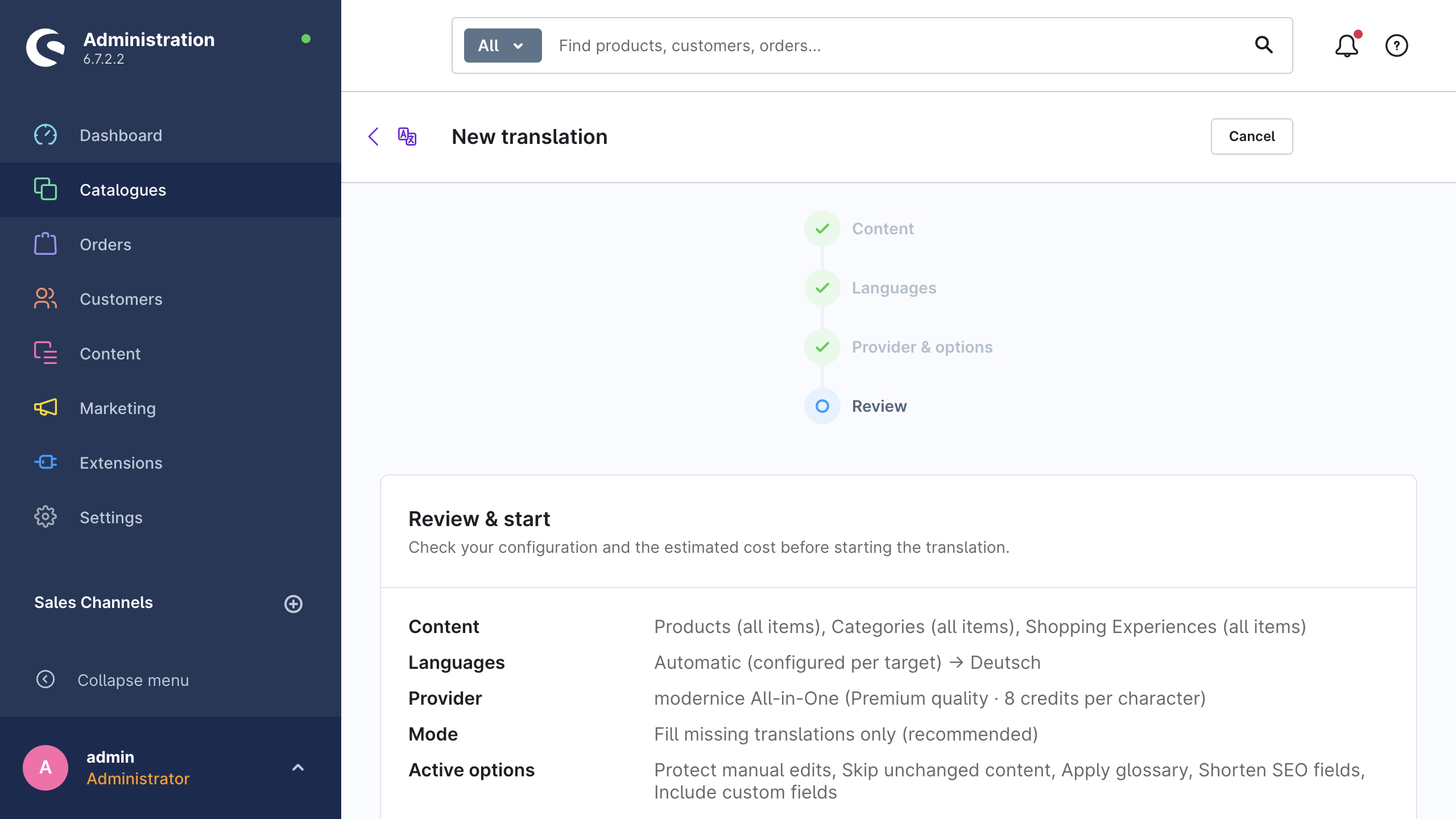
How the extension calculates the estimate
The extension builds the estimate from your real content, in five steps:
- The extension determines how many records are in the scope, for each content type and each target language.
- It loads the source-language values of the fields that it would translate, with your excluded fields and the field allowlist already applied.
- It protects the placeholders (Twig variables, snippet placeholders, URLs) first, then counts the remaining characters.
- For HTML fields it counts the visible text only. It removes the tags and decodes the entities before it counts.
- It converts the character total into money or credits, with the price list of the selected provider.
The extension measures a sample of a large set. It counts up to 500 records per content type in full. Above that number, it measures 100 records and extrapolates their average across the full record count. A note under the panel gives this warning: The estimate is based on sampling and may differ from the final result.
Characters, tokens and credits
| Provider type | Basis | Shown as |
|---|---|---|
| Machine translation (DeepL, Google Translate) | Source characters × the rate per character of the provider | Estimated cost in USD |
| AI models (OpenAI, Anthropic, Gemini, Mistral) | Tokens ≈ characters ÷ 4, applied to the input side and the output side, priced with the input rate and the output rate of the model | Estimated cost in USD |
| modernice All-in-One | Source characters × the multiplier of the service tier | Estimated credits and Credits remaining |
The token heuristic assumes that a translation has approximately the length of its source. The extension therefore applies the same token count to the text that it sends and to the text that comes back. The Understanding prices card on Settings → Providers shows the same arithmetic next to the current price lists of all providers.
Where the estimates appear
- The Review step of the wizard shows Items to translate, Characters (estimated) and the cost or the credits. It refreshes each time that you change the configuration.
- The quick-translate dialog on a product or a category shows an estimate on one line: Approx. {characters} characters in {items} – estimated cost: {cost}.
- The CLI shows no estimate.
bin/console nice-translate:runcreates the job and starts it without a cost calculation and without a cost output. If you need a figure for a CLI run, take it from a comparable wizard estimate.
If the estimate itself fails, you can still start the run. The panel then shows The estimate could not be calculated. You can still start the translation. One case blocks a run: a run through modernice All-in-One whose estimated credits exceed the remaining quota.
Estimate accuracy
The estimate is an upper limit for your planning. Four things move the final figure away from it:
- Fill-missing mode skips fields during the run. The run skips the fields that already have a translation, therefore the real volume is frequently lower. A note in the wizard gives this warning: Fill-missing mode: fields that are already translated are skipped at runtime — the actual cost can be lower than this estimate.
- The safety options skip more. Skip unchanged content and Protect manual edits delete records from the run that the estimate counted.
- The extension measures a sample of large sets. Above 500 records per content type, it extrapolates the character volume from a sample.
- Provider prices change. The rates in the extension are the published prices of the providers in USD, and the providers change them.
If you use your own API keys, the invoice of the provider is the authoritative number. For modernice All-in-One, the authoritative quota check happens when the service processes each request. The estimate never replaces that check.
Pre-flight warnings
Before a manual run starts, the wizard examines the configuration and lists each problem that it finds. The warnings do not block the start. They tell you what to correct, or what to expect.
| Warning | What it means | What to do |
|---|---|---|
| {provider} is not configured yet. Add an API key in the settings before starting. | No API key is stored for the selected provider | Add a key under Settings → Providers and test it, or activate modernice All-in-One |
| Unknown translation provider "{provider}". | The configured provider id no longer exists in this installation | Select a provider that is still registered |
| One of the selected target languages no longer exists. | Somebody deleted a selected language | Open the Languages step again and select again |
| Source and target language are identical for "{language}" — these items will fail. | The resolved source language equals the target language | Change the source language for that target under Settings → Advanced → Source languages, or in the wizard |
| The locale "{locale}" cannot be mapped for {provider}. | DeepL or Google Translate has no equivalent for that shop locale | Route that language to another provider under Providers by target language |
| Google Translate does not distinguish between British and American English — both variants are translated as generic English. | en-GB and en-US become one language at Google | Expect identical output for both, or use a different provider for the English variants |
| The content type "{entity}" is not supported and will be skipped. | The content type is not installed, or not translatable in this shop | Delete it from the selection |
| Could not estimate "{entity}": {message} | The estimate for one content type failed | Start the run anyway, or narrow the selection to find the cause |
| No snippet set exists for the source locale "{locale}" — storefront snippets will be skipped. | The source language has no snippet set | Create the snippet set in Shopware, or delete the storefront snippets from the run |
| No snippet set exists for "{locale}". Storefront snippets cannot be translated into this language. | The target language has no snippet set | Create the snippet set for that language first |
| This job needs about {credits} credits, but only {remaining} remain. … | A run through modernice All-in-One exceeds the remaining quota | Reduce the scope, wait for the renewal, change the plan, or use a provider with your own API key |
The monthly usage panel
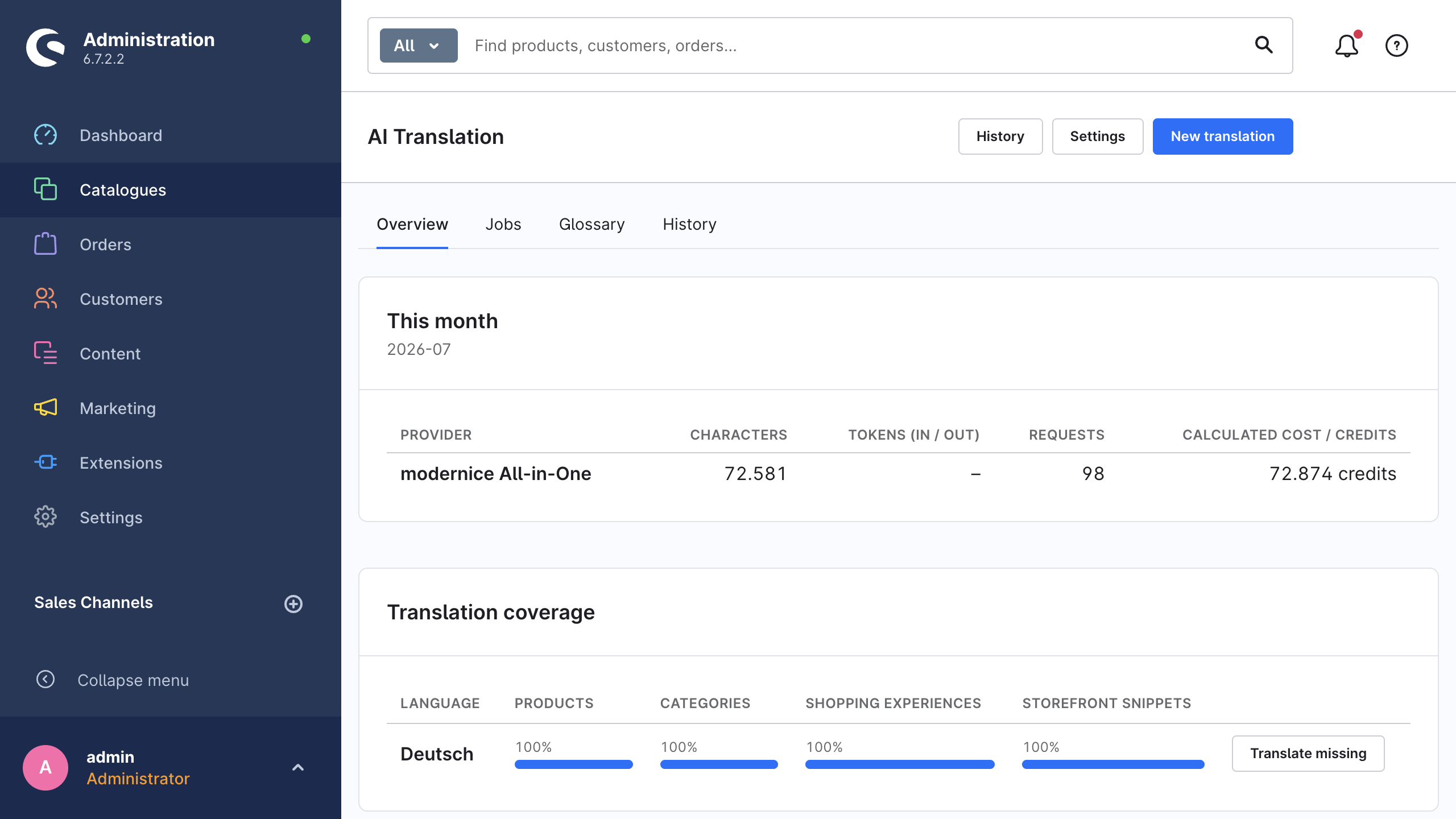
Catalogues → AI Translation → Overview opens with the This month panel. The panel shows one row for each provider that the shop used in the current calendar month.
| Column | What it counts |
|---|---|
| Provider | The provider that received the requests |
| Characters | The source characters that the extension sent |
| Tokens (in / out) | The input tokens and output tokens that AI providers report. Machine translation has no tokens, therefore its cell stays at – |
| Requests | The requests that the extension sent to the provider |
| Calculated cost / credits | The cost calculation of the extension, or the consumed credits for modernice All-in-One |
The panel sorts the rows by character volume. If no run happened yet, the panel shows No usage recorded for this month yet.
WARNING
Calculated cost / credits is the calculation of the extension. It uses the usage that the provider reports and the prices that the extension knows. Some models have no published price in the extension, for example a new model from the live list. For those models the extension calculates with the rate of the default model, therefore the figure is an indication only. The providers also change their prices. Your provider invoice is the authoritative number.
The detail page of the job contains the figures for one job: Billed characters, Cost / credits and, for runs through modernice All-in-One, the service tier and the quota after the translation. See Jobs & monitoring.
Automation runs without an estimate
On-save translation and scheduled translation start in the background. There is no interactive estimate, and no opportunity to read a warning first. Give them a deliberate scope:
- Enable only the content types and the target languages that you want to translate automatically.
- Both automation modes fill in the missing translations only.
- Examine the monthly usage panel after the first day or two of a new automation setup.
Automation describes the full configuration.
Reduce the cost
Each item below is a setting that the extension already has.
- Translate only what is missing. In the wizard, set the scope to Only items without translation and the mode to Fill missing translations only (recommended). The scope makes the record set smaller, and the mode skips the translated fields during the run.
- Keep Skip unchanged content enabled. The run skips the content that did not change after the last run. On repeat runs this is the most effective option.
- Keep Protect manual edits enabled. The run never overwrites a hand-corrected translation.
- Exclude the fields that you maintain per market. Settings → Advanced → Excluded fields deletes a field from each run. The product
descriptionis the usual candidate, when each market writes its own text. - Switch Include custom fields off in the wizard when a content type contains large custom-field payloads that you do not need in other languages.
- Route the languages to different providers. Use Settings → Providers → Providers by target language. Send the high-volume languages to a machine-translation provider, and keep an AI model for the languages where the wording is important.
- Select a cheaper model. The model dropdown shows a tier and both token prices. The Budget — ideal for bulk models are typically an order of magnitude cheaper than the flagship models.
- Select the correct service tier if you use modernice All-in-One: Speed costs 1 credit per source character, Balanced costs 3 and Premium quality costs 8.
- Use the free allowances of the providers. The providers publish these figures. The API Free plan of DeepL includes 500,000 characters per month at no cost. The first 500,000 characters per month of Google Translate are also free. That is sufficient for a small catalogue or for a test. Read the current terms on the price list of the provider before you depend on them.
- Read the coverage report before you start a run again. Coverage shows the remaining gaps in each language. It measures the products, the categories, the Shopping Experiences and the storefront snippets. Its Translate missing button opens the wizard with that language preselected.
Related pages
- Translation providers: the pricing basis and the model choice for each provider.
- modernice All-in-One: the credits, the tiers and the quota.
- Translation wizard: where the estimate is.
- Settings reference: each setting above with its default.