

modernice All-in-One
modernice All-in-One lets you translate without a provider account of your own. You book it inside the extension as a Shopware In-App Purchase. The translations then go through the modernice service, against a monthly credit allowance.
What it includes
- Translations without a provider account and without an API key of your own.
- Zero data retention for each request: the providers in the pool keep no copy of the text that they receive. With your own API keys, zero retention needs a separate agreement with each provider.
- A monthly credit allowance for each plan, listed below.
- Billing through your Shopware account. You cancel the plan in the Shopware Store.
modernice All-in-One appears as one more entry in the provider lists. The wizard labels it modernice All-in-One — no API key needed. It operates with the glossary, the history, the automation and the coverage report like each other provider.
If you already have provider contracts, or if you want to compare, see Translation providers.
Plans
There are four monthly plans, each with an included credit allowance:
| Plan | Shopware In-App Purchase id | Included credits per month |
|---|---|---|
| Starter | NiceTranslateAllInOneStarter | 4,000,000 |
| Growth | NiceTranslateAllInOneGrowth | 12,000,000 |
| Scale | NiceTranslateAllInOneScale | 32,000,000 |
| Enterprise | NiceTranslateAllInOneEnterprise | 96,000,000 |
Each plan includes all three service tiers and uses the same models. The size of the allowance is the only difference between the plans.
The service consumes credits for each source character, multiplied by the service tier of the run (see below). The Shopware In-App Purchase dialog shows the prices and the terms at checkout.
Service tiers
Each translation uses one of three service tiers. The tier controls the translation quality and the number of credits that a character consumes:
| Service tier | Credits per source character |
|---|---|
| Speed | 1 |
| Balanced (default) | 3 |
| Premium quality | 8 |
You can set the tier in three places:
- Settings → Subscription → Default service tier sets the default for the full shop. That default is Balanced.
- The Provider & options step of the wizard has its own Service tier field for one run.
- The quick-translate dialog on a product or a category offers the same three options.
Use these rules to select a tier:
- Speed suits large volumes where the throughput is more important than the nuance: a large catalogue, property values, delivery times, the long tail of categories.
- Balanced is the default and suits most content.
- Premium quality suits the content that carries revenue: the product descriptions of your best sellers, campaign landing pages, CMS layouts, email templates.
The tier is the largest lever on the reach of a plan. A run of 100,000 characters costs 100,000 credits at Speed, 300,000 credits at Balanced and 800,000 credits at Premium quality.
Prerequisites
Your shop must have a connection to the Shopware Store, because Shopware In-App Purchases need one. Connect the account of the administration user under Extensions → My extensions before you subscribe.
Without that connection, the subscription card cannot read or refresh the purchase state. It then shows modernice All-in-One is currently not available. Connect your shop to the Shopware Store or use your own API keys.
Activate the subscription
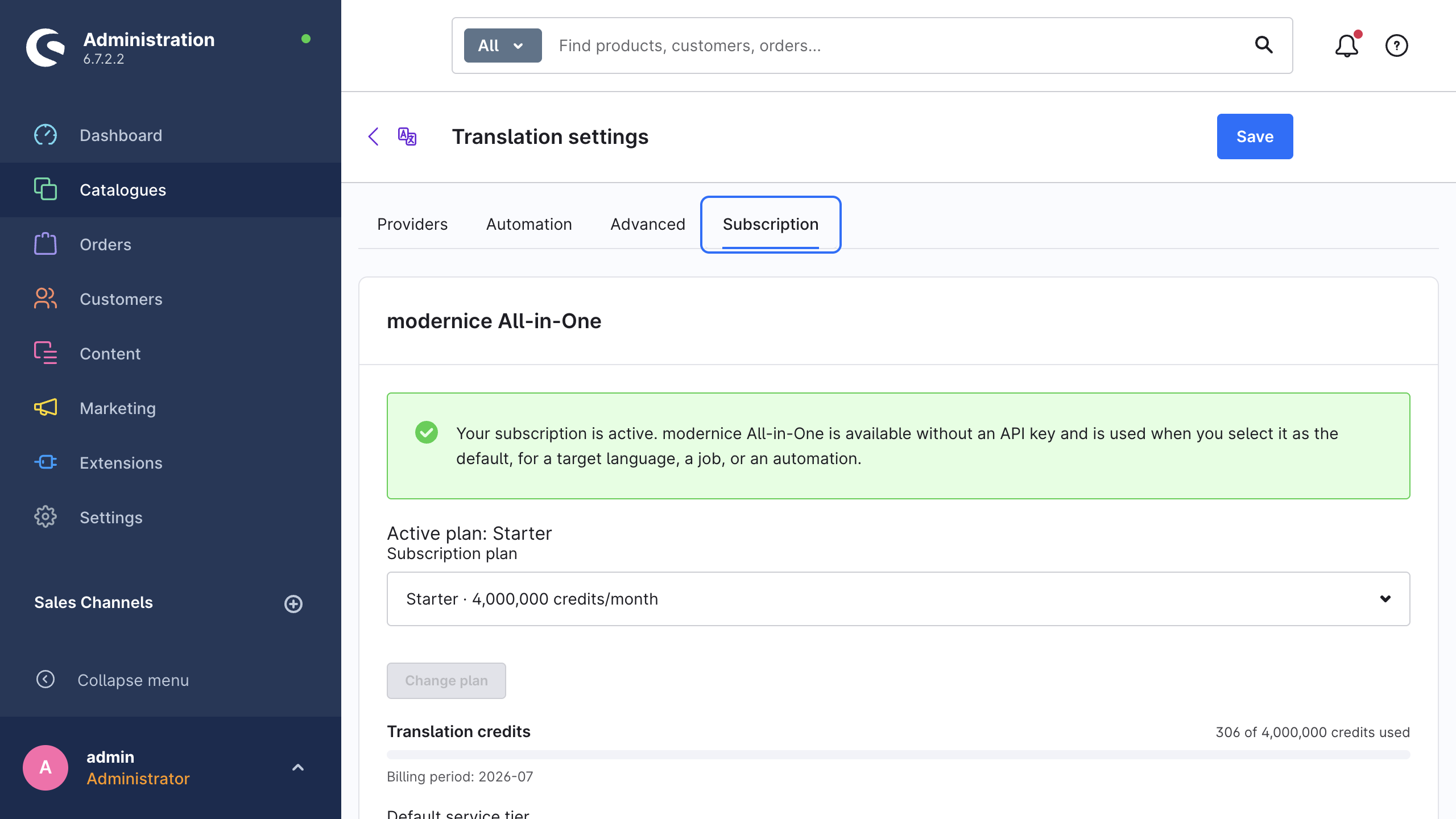
- Open Catalogues → AI Translation, click Settings and go to the Subscription tab.
- Select a plan under Subscription plan.
- Click Subscribe. The in-app purchase checkout of Shopware opens.
- Complete the purchase in the Shopware dialog.
- After the checkout closes, the card refreshes by itself. If it still shows the old state, click Refresh status.
After the plan is active, the card shows your Active plan, your credit usage and the Default service tier field. Use Change plan to go to another plan.
Click Save after you change the default service tier.
Credits and quota
Five places show your credit balance:
| Where | What you see |
|---|---|
| Settings → Subscription | Translation credits as {used} of {included} credits used with a progress bar, and Billing period |
| Wizard, Review step | Estimated credits for this run and Credits remaining |
| Quick-translate dialog | The estimate line with the credits that the selection consumes |
| Job detail page | The requested and the delivered service tier with its credit multiplier, and Quota after translation |
| Dashboard, This month | The managed row under Calculated cost / credits |
For each managed request, the extension records six accounting figures: the requested tier, the delivered tier, the credit multiplier, the source characters, the debited credits and the number of provider attempts.
If the estimated credits for a run exceed the remaining credits, the wizard blocks Start translation. It then tells you to reduce the scope, to wait for the renewal, to upgrade, or to use a provider with your own API key. The wizard blocks a quick translation in the same way.
WARNING
The estimates are advisory. The authoritative quota check happens later, when modernice All-in-One processes each request. A run that starts with a thin margin can therefore still stop when the credits end. The affected records fail with Included translation credits are exhausted. Wait for renewal, upgrade, or select a provider with your own API key. You can translate them again after a renewal or an upgrade.
If the extension cannot read the balance at some moment, the translation continues, and the card shows The quota could not be fetched right now. Translations continue to work.
Cost & usage describes how the extension produces the estimates.
Combine it with your own API keys
modernice All-in-One and your provider keys operate side by side:
- Each API key that you stored under Settings → Providers continues to operate, with or without an active subscription.
- You can select modernice All-in-One as the Default provider, or map it to individual languages under Providers by target language.
- Each wizard run, quick translation and CLI run selects its own provider. modernice All-in-One can therefore serve one language while a machine-translation key serves another language.
A common division uses modernice All-in-One for the languages that you translate rarely. Your own DeepL key or Google key then serves the bulk languages that you already pay for.
Status messages
| Banner | What it means | What to do |
|---|---|---|
| A signed Shopware entitlement is stored, but no All-in-One plan is active. | The plan is no longer active, for example after it expired | Renew the plan in the Shopware Store, then click Refresh status |
| The Shopware Store connection, signed entitlement or modernice All-in-One cannot currently be reached. | The Store connection or the service is temporarily unreachable | Refresh the Store connection under Extensions → My extensions, then click Refresh status. Until then, use a provider with your own API key |
| modernice All-in-One is currently not available. Connect your shop to the Shopware Store or use your own API keys. | The shop has no connection to the Shopware Store | Connect the Shopware account of the administration user |
Job errors about the subscription use the same words on the job detail page. See Troubleshooting.
Data protection
In managed mode, the content that you select for translation goes to MODERNICE LIMITED. It does not go directly to a provider account of yours. The providers that serve the request operate under zero data retention and keep no copy of the text that they receive. The Data protection page documents what the extension transmits, how long each party keeps it and what your responsibilities are. Your own privacy information must state the mode that you enable.
Related pages
- Translation providers: the six providers that you can connect with your own key.
- Cost & usage: the estimates, the warnings and the monthly usage panel.
- Settings reference: the Subscription tab field by field.